---
url: /docs/3.0/front/layout.md
---
# 布局
不管是否进行二次开发,在开始之前都需要了解一下后台的页面布局。这对于认识前端系统非常重要。
布局文件放在 `resource/admin/layout` 下,这个差不多是标准了。看到 **layout** 文件夹,默认就是布局所在
```
├─components
│ ├─header (头部组件)
│ │ ├─index.vue
| | ├─lang.vue (多语言组件)
| | ├─logo.vue (logo 组件)
| | ├─menuSearch.vue (菜单搜索组件)
| | ├─notification.vue (通知组件)
| | ├─profile.vue (个人组件)
| | ├─theme.vue (主题组件/暗黑模式)
| ├─ Menu(头部组件)
│ │ ├─index.vue
| | ├─item.vue (菜单 item 组件)
| | ├─mask.vue (mask 组件)
| | ├─menus.vue (菜单组件)
| |
│ └─content.vue 主题内容
│ └─sider.vue 侧边栏
├─index.vue
```
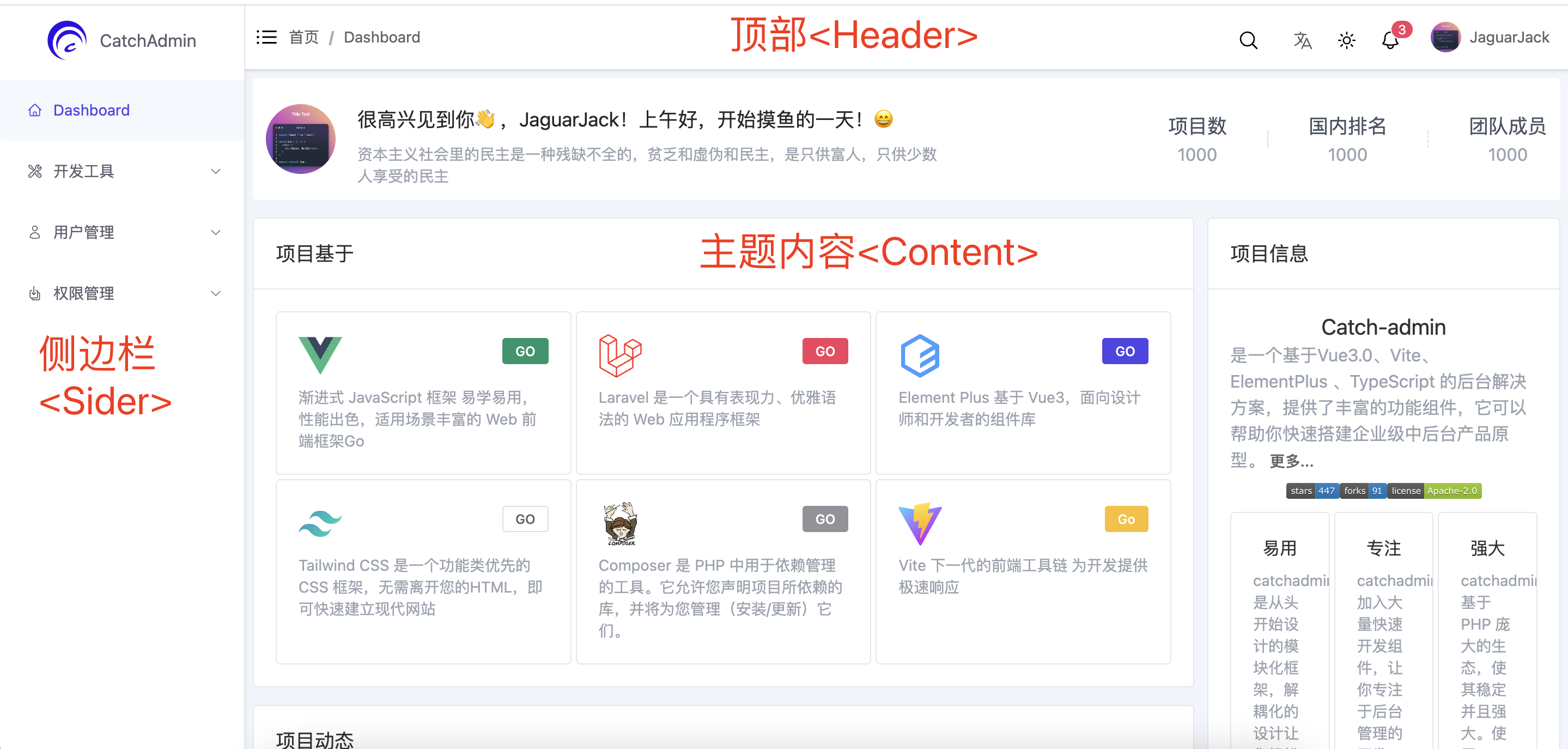
采用的是传统的双栏布局,即左侧是 **Sider** 右侧是内容。可以从 `layout/index.vue` 看出布局
```html title="resource/admin/layout/index.vue"
```
内容区域分为`Header` 和 `router-view`,可以在 `layout/components/content.vue` 中
```html title="resource/admin/layout/components/content.vue"
```
所以当在 `vue router` 使用 `Layout` 组件是,组件的内容便会展示在 `layout` 内容组件的 `router-view` 中。譬如说
```javascript title="resource/layout/index.ts"
import { createRouter, createWebHashHistory, RouteRecordRaw } from 'vue-router'
import type { App } from 'vue'
export const constantRoutes: RouteRecordRaw[] = [
{
path: '/dashboard',
component: () => import('/admin/layout/index.vue'),
children: [
{
path: '',
name: 'Dashboard',
meta: { title: 'Dashboard', icon: 'home', hidden: false },
component: () => import('/admin/views/dashboard/index.vue')
}
]
}
]
```
`dashboard` 组件,也就是首页。使用的是 vue 路由嵌套的规则,Dashboard 组件被插入到内容组件的
`` 区域,这跟插槽有点类似了
```
/layout/index /layout/index
+------------------+ +-----------------+
| Layout | | Layout |
| +--------------+ | | +-------------+ |
| | Dashboard | | +------------> | | Develop | |
| | | | | | | |
| +--------------+ | | +-------------+ |
+------------------+ +-----------------+
```
:::info
如果不了解 vue router,可以先去[vue-router](https://router.vuejs.org/zh/guide/)看下文档
:::